Scientific Computing and Data / High Performance Computing / Documentation / Minerva Restricted Cluster
Minerva Restricted Cluster
Minerva-Res is a dedicated, secure high-performance computing (HPC) environment available to all qualified researchers at Mount Sinai, purpose-built to store and process controlled-access data — including approved data accessed through an NIH Controlled-Access Data Repository and Centers for Medicare & Medicaid Services (CMS) Research Identifiable Files (RIF) and Limited Data Sets (LDS) data paired with a Minerva High-Performance Computing (HPC) Data Management Plan (DMP) Security Assessment Questionnaire (SAQ).
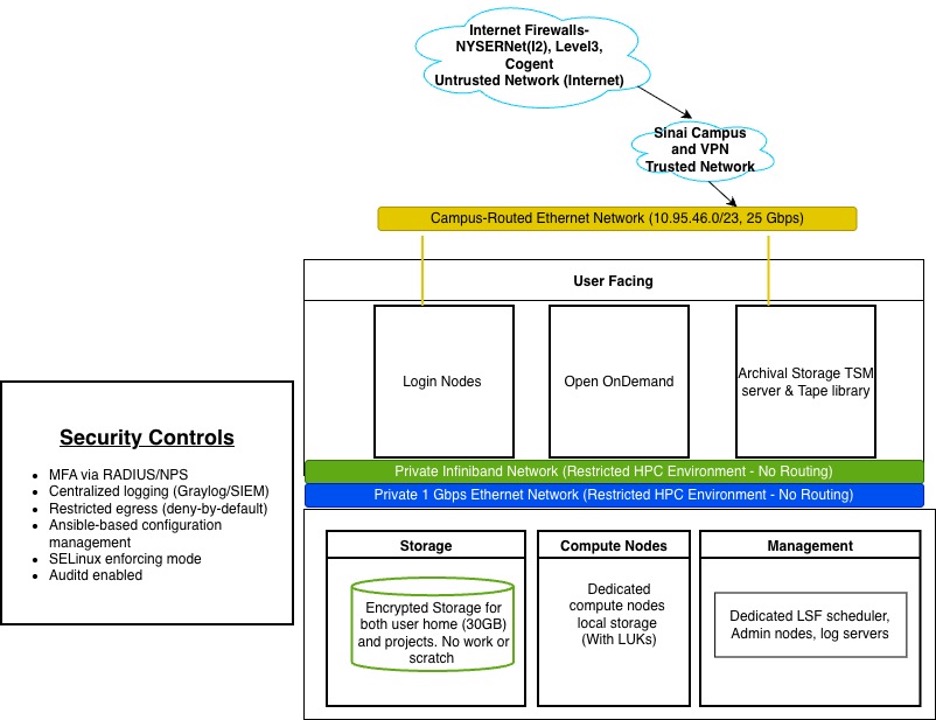
Minerva-Res is a separate cluster from Minerva, with its own dedicated login nodes, storage, home directories, job scheduler, and compute resources, running on an isolated network with elevated security protection. There is no direct connection between Minerva and Minerva-Res.
To meet these requirements, Minerva-Res is built to the federal security standard NIST SP 800-171 Rev. 3, covering data from all 39 repositories. Minerva-Res is encrypted at rest and in transit, and access is tightly controlled.
1 Projects
Access to the Minerva Restricted Cluster is managed exclusively on a per-project basis. Before any user accounts can be provisioned, projects must undergo a formal request and approval process. Principal Investigators (PIs) are responsible for managing these projects, ensuring that all activities remain covered by a valid Data Use Agreement (DUA) administered by the institutional Grants and Contracts Office (GCO).
To initiate a project, PIs should:
- Submit the Minerva Restricted Cluster: Project Resource Allocation Request Form.
- Review and acknowledge the Annual Minerva Restricted Supercomputer Policies and Procedures. Once logged in, navigate to Minerva-Res Forms and select Minerva Restricted Supercomputer Policies and Procedures.
For more details, please refer to the project allocation documentation.
2 Accounts
Individual user access is strictly tied to an active, approved project. Users are limited to accessing only the specific data necessary for their authorized research objectives.
Requirements for obtaining access:
- Existing Access: You must hold an active Minerva account. If you do not have one, please submit a request here.
- Policy Compliance: You must review and formally agree to the Annual Minerva Restricted Supercomputer Policies and Procedures. Once logged in, navigate to Minerva-Res Forms and select Minerva Restricted Supercomputer Policies and Procedures.
- PI Authorization: Your request will generate an email notification to your Principal Investigator, who must explicitly approve your access.
Both PIs and users are responsible for account maintenance, including ensuring continued affiliation with the institution and strict adherence to DUA obligations and project associations.
Please visit our user account guidance page for more information.
3 Storage
Minerva-Res uses an encrypted-at-rest filesystem (GPFS) for all user data.
Check Quota Commands
df -h /arionencrypt/projects/<projectid>

# Or for CMS data:
df -h /arionencrypt/cmsdata/<projectid>
Storage Types
| Storage Type | Path | Quota | Notes |
|---|---|---|---|
| Home Directory | /arionencrypt/users/<userid> |
30 GiB, 1M files | Encrypted-at-rest (GPFS) |
| Project Data | /arionencrypt/projects/<projectid> |
Per project allocation | Encrypted-at-rest (GPFS) |
| CMS Project Data | /arionencrypt/cmsdata/<projectid> |
Per project allocation | Encrypted-at-rest (GPFS) |
4 Logging In
There are currently two login nodes available for general use: ci06e01 and ci06e02. You may connect to one of them through one of two round-robin Domain Name Server (DNS) load-balancing names, or you may specify one explicitly if you prefer (e.g., to reconnect to a disconnected screen session).
Node Addresses
- Recommended (Round-Robin):
minerva-res.hpc.mssm.edu - Specific Node 1:
ci06e01.hpc.mssm.edu - Specific Node 2:
ci06e02.hpc.mssm.edu
Login Command Example
ssh yourUserID@minerva-res.hpc.mssm.edu

(yourUserID@minerva.hpc.mssm.edu) Password: <Enter your Sinai School Password Only>

Enter Your Microsoft verification code<609017>- Password: Enter your Sinai School Password only.
- MFA: Complete your Microsoft Azure multi-factor authentication when prompted on your mobile device.
For complete details, please visit the Minerva’s Authentication.
5 Software Environment
Software is available through the read-only module system at /hpc/packages. Use the module command to load available applications:
module load <software_name>For complete details, please visit the Software Environment: Lmod Documentation. To request additional software, send a ticket to hpchelp@hpc.mssm.edu.
6 Running Jobs (LSF Scheduler)
Workloads are managed by the IBM Spectrum LSF scheduler. Do not run computationally intensive tasks directly on the login nodes—all jobs must be submitted to the scheduler.
Important Differences from Standard Minerva
Unlike the standard Minerva cluster, the LSF configuration on Minerva-Res is restricted to maintain security and compliance:
- Available Queues: Only the
expressandpremiumqueues are available. Interactive and long queues, which are available on the standard Minerva cluster, are not available on Minerva-Res. - GPU Resources: There are no GPU queues or GPU-accelerated resources available on Minerva-Res.
For standard non-controlled workloads that require interactive queues, long runtimes, or GPU access, please use the standard Minerva cluster.
For complete details, please visit the Load Sharing Facility (LSF) Job Scheduler Documentation.
7 Open OnDemand
A dedicated portal at ondemand-res.hpc.mssm.edu provides browser-based access to applications including Desktop, SAS, Stata, Jupyter, and RStudio.
For complete details, please visit Open OnDemand Documentation.
8 AI & minerva-llm Module
The minerva-llm module provides researchers with access to centrally managed, locally hosted AI models (like Llama and TinyLlama) to perform local inference securely without downloading external repositories.
1. Data Security & NIH Guidance
- Researchers must comply with NIH guidelines regarding controlled-access human genomic data.
- Do not share genomic data, derivatives, or models trained on NIH controlled-access data with public generative AI tools. Refer to the NIH Guide Notice for full details.
2. Conda Environment Setup
To run LLM applications, it is recommended to set up a dedicated Python environment:
- Load Proxies & Miniforge: Load standard/restricted proxies and the Miniforge module.
- Create & Activate Environment: Create a Python 3.12 environment (
llm-test) and prevent Python from pulling packages from the local user directory. - Install Packages: Install required packages (
pytorch,transformers,accelerate,sentencepiece,protobuf,wrapt).
3. Loading the Module & Listing Models
- Load the module: Use
module load minerva-llm/1.0to configure runtime environment variables. - List available models: Run
minerva-llm-listto view locally hosted models. - Search models: Filter models using keywords (e.g.,
minerva-llm-list llama).
4. Running Inference in Python
- Access the local models directory using the
$MINERVA_LLM_MODELSenvironment variable. - Load models and tokenizers locally using Hugging Face’s
transformerslibrary (AutoTokenizerandAutoModelForCausalLM).
5. Running on Login Nodes
- Running multi-threaded inference on shared login nodes can trigger thread limits and cause failures.
- To prevent this, set CPU/thread limit environment variables (e.g.,
export OMP_NUM_THREADS=1) before executing scripts on a login node (not required on dedicated compute nodes).
For complete details, please visit minerva-llm Module Documentation.
9 Data Transfer
All data transfer to and from Minerva-Res must use an approved method.
- Standard SFTP/SSH and general internet access are disabled by default
- Only whitelisted proxy sites are permitted, for defined periods
- All transfers are logged
- Users remain responsible for DUA-mandated restrictions on their data
Approval requirements
| Transfer Type | Approval Required |
|---|---|
| Data In | HPC approval |
| Data Out — Non-Controlled | PI approval |
| Data Out — Controlled | Not permitted without formal review and DUA authorization (contact hpchelp@hpc.mssm.edu) |
Non-Controlled Data
Reviewed by the PI and confirmed free of NIH/CMS controlled-access or participant-level genomic data.
- In:
- Stage files in
/sc/arion/projects/<project>/from-arion-to-arionencrypt/<userid>on Arion - Submit a data transfer request
- HPC transfers to Minerva-Res staging
- Move files into your working directory
- Stage files in
- Out:
- Stage files in
/arionencrypt/projects/<project_res>/from-arionencrypt-to-arion - Submit a data transfer request
- PI approves
- HPC transfers to Arion staging
- Move files into your working directory
- Stage files in
Controlled Data
- In: Direct download from approved repositories only.
- Requires External Connectivity Request Form (justification + source IP/subnet)
- Security review: 2–3 weeks
- Approved IPs are allow-listed for the transfer window only, then removed
- Access is one-time only — notify HPC once no longer needed; re-request for future transfers
- Out: Prohibited unless expressly authorized under the applicable DUA and institutional review (contact hpchelp@hpc.mssm.edu).
For complete details, please visit the Data Transfer Guide for Minerva-Res.
10 Network & Internet Access
Login and compute nodes (currently CPU only) have no general campus or internet connectivity. If internet access is required for a workflow, it must be routed through a whitelisted destination for a designated timeframe. Circumventing network controls is strictly prohibited.
- External network access: If external connectivity is required, please follow these steps:
- Complete the External Connectivity Request Form and provide the required information, including the justification for the request and the external IP address or subnet that needs access.
- The HPC team will review the request and evaluate the research justification. Additional information may be requested if needed. All requests are subject to security review and approval.
- Following approval, the requested IP source will be whitelisted for the designated timeframe.
- Access Types & Durations:
- One-time access: Access will be removed 7 days after it is granted. Users will be notified of the scheduled removal.
- Weekly or monthly access: Access will remain in place until the next quarterly internal review by the Minerva team.
- Annual access: Access will be removed 7 days after the approved activity is completed.
- Other use cases: Access duration will be determined on a case-by-case basis.
- Whitelisted URLs: To access whitelisted URLs, use the command
module load res_proxies. - Inter-node Communication: Compute nodes communicate over a private InfiniBand network for high-speed data transfer.
11 Long-Term Data Archive: TSM (Tivoli Storage Manager)
TSM clients can be accessed directly on Minerva-Res login nodes. For complete details, please visit Access TSM with Command Line Documentation.
12 Unsupported Services
The following services are not supported on Minerva-Res:
- Databases
- Globus
- Posit Connect
- Web servers
- On-the-fly scripts (Jupyter, RStudio IDE, Ollama)
13 Security & Compliance
Minerva-Res is a strictly monitored environment designed to protect sensitive data and maintain NIST SP 800-171 compliance. The environment enforces strict restrictions and monitoring protocols beyond standard HPC settings:
- Minimum Necessary Principle: Users must only access data specifically required for their approved research.
- Network Tunnels: Bypassing security controls, creating unauthorized network tunnels, or using unapproved proxies is forbidden.
- Session Monitoring: Sessions that remain idle will be automatically terminated after 12 hours.
- Command Auditing: All command activity is logged to central security platforms (Graylog/SIEM) for security auditing and system health monitoring.
Violations of compliance may result in immediate access revocation and escalation per institutional policy.